

Zoho Meeting - Online Meetings
Zoho Corporation
Create Screenshots Like Zoho Meeting - Online MeetingsApp Store Screenshots (9)


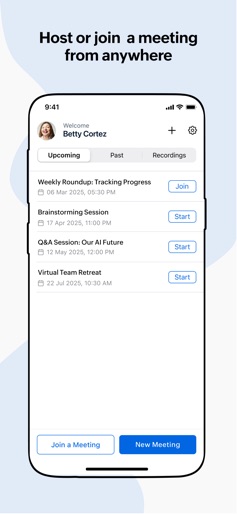
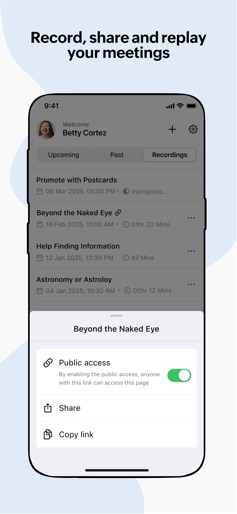


Design Analysis
Visual Design
Style: iOS Native
Key Features Shown
- •Grid video view
- •Active speaker pinning
- •Participant moderation
- •In-meeting chat with file sharing
- •Meeting list/dashboard
App Insights
Target: Small to Medium Businesses (SMBs) and enterprises already utilizing the Zoho ecosystem (CRM, Books, Projects) for unified communication.
- •Subscription (via Zoho One or Zoho Meeting web portal)
- •Freemium (limited duration/participants)
ASO Keywords:
About Zoho Meeting - Online Meetings
Stay connected on the go! Host or join a secure online meeting with up to 250 participants and collaborate with audio, video and screen sharing. Attend live webinars, participate in polls, interact with organizers using Q&A, and "raise hand" and talk during the webinar on organizer's approval. Host unlimited meetings - Schedule online meetings and send email invitation to the participants. When quick decisions and ad hoc collaboration are needed, conduct instant meetings from anywhere, in a matter of seconds. - Easily join a meeting using the invitation link, or the meeting ID. Participants do not require an account to join meetings. Seamless collaboration - Collaborate with your team in real-time using video, audio, and screen sharing with our fully featured video conferencing software. - Use your front or back camera for video meetings and build consensus through face-to-face collaboration, leaving no space for confusion or ambiguity. - View the shared screen or application and collaborate contextually with other meeting participants. Share your mobile screen during meeting. Secure online meetings - Keep your meetings secure using password protection and prevent unwanted visitors or interruptions. - Hold organized conversations. Mute individuals or all participants to reduce noise and foster more productive discussion. - Maintain your privacy by removing anyone who may have joined inadvertently. You can also remove participants when they're no longer part of the discussion. Share files and record meeting Keep your chat conversations contextual during meeting. Send messages and emojis, share images and files with everyone and reply or react to a message. Screen, audio and video shared by you can be recorded by the meeting host joined from the computer or on the mobile device. The recorded video can be played online and shared with anyone. Webinar Features: Attend webinars on the go, view the shared screen/application. Interact with the organizer/co-organizer using audio, video, Q&A, polls and "raise hand" options. Co-organizers can join the webinars even when on the move and engage the attendees through audio/video. Interact with the organizers by asking verbal questions if the organizer/co-organizer allows you to talk during the webinar. Testimonials: "Very useful meeting tools, as we use for Zoho for our CRM and accounts, it was an easy choice to use Zoho Meeting as well. Very good for remote demo’s." Tolik Rozensteins Business Development Manager, Security & Vetting Solutions Ltd “We now have several weekly team meetings that allow everyone to be in sync with each other. And for our customers we have created a series of live webinars and group meetings where they can speak directly with our team and learn about raising solitary bees.” Karl Alexander Marketing Director, Crown Bees Your invaluable feedback is instrumental in enhancing the user experience. Please share your questions/feedback at meeting@zohomobile.com.
Create screenshots like Zoho Meeting - Online Meetings
Use FlyerBanana's free editor to create professional App Store screenshots inspired by Zoho Meeting - Online Meetings's design. 100+ templates, device frames, and one-click export.











