Hearts: Classic Card Game icon

Hearts: Classic Card Game

Topy Games

Card Game
4.8(241 ratings)
Free
Create Screenshots Like Hearts: Classic Card Game

App Store Screenshots (6)

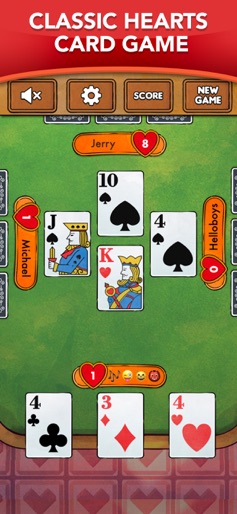
Hearts: Classic Card Game screenshot 1
Hearts: Classic Card Game screenshot 2
Hearts: Classic Card Game screenshot 3
Hearts: Classic Card Game screenshot 4
Hearts: Classic Card Game screenshot 5
Hearts: Classic Card Game screenshot 6

Design Analysis

Visual Design

App Insights

About Hearts: Classic Card Game

Hearts is a classic competitive card game, which is one of the greatest card games designed for four players.It sharpens your brain and makes you relax and have fun! Our Hearts has large and beautiful cards, a self-selectable background and card back, simple and easy processes to understand and amazing artificial intelligence to give you an experience like never before. What are the benefits of our Hearts app? + Based on real offline Hearts game experience. + Clear card game interface, pure Hearts game experience. + AI difficulty rating, suitable for both experienced Heart gamers and beginners. + The background and card back can use any pictures of the players themselves, or use the three sets of different styles of card faces , Card back, background we provide. + Game stats are readily available to players. Some tips for beginners at Hearts! - Try to avoid points as much as possible in Hearts - Each heart suit is worth 1 point - Watch out for the Queen of Spades - a card worth 13 points! - If you collect all the hearts and the Queen of Spades in the game, they will be called "shoot the moon" and your opponents will get 26 penalty points each!

Create screenshots like Hearts: Classic Card Game

Use FlyerBanana's free editor to create professional App Store screenshots inspired by Hearts: Classic Card Game's design. 100+ templates, device frames, and one-click export.

More Card Game Apps

View all

Frequently Asked Questions

How can I create screenshots like Hearts: Classic Card Game?
You can create App Store screenshots inspired by Hearts: Classic Card Game using FlyerBanana's free screenshot editor. Choose from 100+ templates, customize colors, text, and device frames, then export in all required sizes.
What screenshot sizes does Hearts: Classic Card Game use?
Hearts: Classic Card Game uses standard App Store screenshot sizes including 6.7" (1290×2796px), 6.5" (1284×2778px), and 5.5" (1242×2208px) for iPhones. FlyerBanana supports all required sizes with one-click export.
Can I use Hearts: Classic Card Game's screenshot style for my app?
Yes! While you shouldn't copy screenshots directly, you can use Hearts: Classic Card Game's design patterns as inspiration. FlyerBanana's templates let you create professional screenshots with similar layouts, color schemes, and visual styles.
What makes good Card Game app screenshots?
The best Card Game app screenshots clearly showcase key features, use consistent branding, include compelling copy, and follow App Store guidelines. Browse our Card Game inspiration gallery to see what top apps do well.