

App Store Screenshots (5)

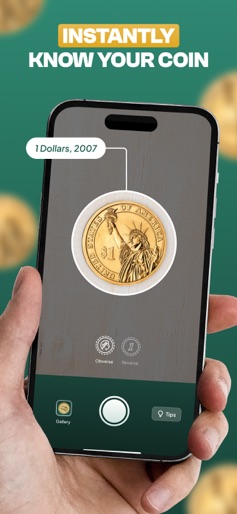
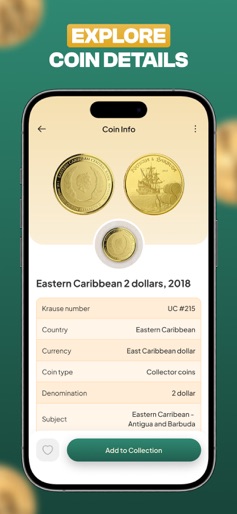


Design Analysis
Visual Design
Style: iOS Native
Key Features Shown
- •Multi-coin identification
- •Obverse/Reverse scanning
- •Detailed numismatic data (Krause #, composition)
- •Reference price range
- •Collection folders
App Insights
Target: Casual coin finders, amateur numismatists, and history enthusiasts who need quick valuations and digital inventory management.
- •Monthly Subscription
- •Yearly Subscription
- •Free Trial
ASO Keywords:
About CoinID AI Coin Identifier
Snap a pic, get the facts! Instantly identify any coin, learn its value, and grow your collection with ease. Your pocket-sized coin expert! Whether you're a curious beginner or a seasoned numismatist, this app is your ultimate companion for identifying, valuing, and collecting coins from around the globe. Identify Coins Instantly Just take two photos—front and back—and let our powerful AI do the rest. You'll get a precise match from our extensive global database within seconds. No more guesswork or hours of internet searching! Discover Coin Details Every coin has a story. Learn about its country of origin, year of minting, metal composition, diameter, weight, historical background, and more. The app even shows you up-to-date market values to see what your coin might be worth today. Organize Your Collection Build your digital coin cabinet! Add coins to your collection, create custom categories, and keep track of your growing inventory. You're in control, whether it's by country, era, or theme. Key Features: - Lightning-fast AI coin recognition - Details on coins from every continent and era - Real-time reference pricing - Ability to create and manage multiple coin collections - Clean, intuitive design for easy navigation Perfect for Everyone From casual collectors to hardcore hobbyists, this app makes it simple—and fun—to explore the fascinating world of coins. Start a new hobby, reconnect with an old one, or teach kids about history and geography through numismatics. Ready to unlock the stories behind your coins? Download now and turn your camera into a coin expert! Additional Subscription Information Subscription Policy You can subscribe to a monthly or yearly subscription. Payment will be charged to your iTunes Account at confirmation of purchase. Subscription automatically renews unless auto-renew is turned off at least 24 hours before the end of the current period. Account will be charged for renewal within 24-hours prior to the end of the current period. Subscriptions may be managed and auto-renewal may be turned off by going to Account Settings after purchase. Any unused portion of a free trial period, if offered, will be forfeited when the user purchases a subscription, where applicable. Terms of Use: https://appixi.net/terms-of-use/ Privacy Policy: https://appixi.net/privacy-policy/ About Us https://appixi.net
Create screenshots like CoinID AI Coin Identifier
Use FlyerBanana's free editor to create professional App Store screenshots inspired by CoinID AI Coin Identifier's design. 100+ templates, device frames, and one-click export.










