
App Store Screenshots (3)

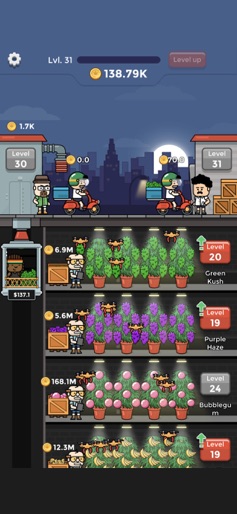

Design Analysis
Visual Design
Style: Custom
Colors:
accent
primary
secondary
Vertical stackingProgress barsFloating currency iconsTop-bar stats (Level, Cash)
Key Features Shown
- •Underground Factory levels
- •Delivery scooter mechanic
- •Manager automation
- •Strain variety (Green Kush, Purple Haze, etc.)
- •Elevator transport system
App Insights
Target: Casual gamers interested in idle/tycoon mechanics with a counter-culture or 'stoner' theme.
Monetization:
- •In-App Purchases (Remove Ads, Currency)
- •Rewarded Video Ads
- •Forced Interstitial Ads
ASO Keywords:
WeedFactoryIdle
About Weed Factory Idle
Manage your WEED FACTORY and become the chillest dude around! Be the finest supplyer by growing the sweetest leaf ever! CONQUER the world and become the BIG BOSS!
Create screenshots like Weed Factory Idle
Use FlyerBanana's free editor to create professional App Store screenshots inspired by Weed Factory Idle's design. 100+ templates, device frames, and one-click export.
More Entertainment Apps
View all
5 shots

YouTube
Entertainment
4.7(45.9M)

9 shots

Spotify: Music and Podcasts
Entertainment
4.8(38.7M)

7 shots

TikTok - Videos, Shop & LIVE
Entertainment
4.7(18.2M)

7 shots

Pandora: Music & Podcasts
Entertainment
4.8(11.1M)

9 shots

Shazam: Find Music & Concerts
Entertainment
4.9(8.6M)

8 shots

Photo Lab Picture Editor & Art
Entertainment
4.5(6.6M)
Frequently Asked Questions
How can I create screenshots like Weed Factory Idle?
You can create App Store screenshots inspired by Weed Factory Idle using FlyerBanana's free screenshot editor. Choose from 100+ templates, customize colors, text, and device frames, then export in all required sizes.
What screenshot sizes does Weed Factory Idle use?
Weed Factory Idle uses standard App Store screenshot sizes including 6.7" (1290×2796px), 6.5" (1284×2778px), and 5.5" (1242×2208px) for iPhones. FlyerBanana supports all required sizes with one-click export.
Can I use Weed Factory Idle's screenshot style for my app?
Yes! While you shouldn't copy screenshots directly, you can use Weed Factory Idle's design patterns as inspiration. FlyerBanana's templates let you create professional screenshots with similar layouts, color schemes, and visual styles.
What makes good Entertainment app screenshots?
The best Entertainment app screenshots clearly showcase key features, use consistent branding, include compelling copy, and follow App Store guidelines. Browse our Entertainment inspiration gallery to see what top apps do well.