

App Store Screenshots (8)

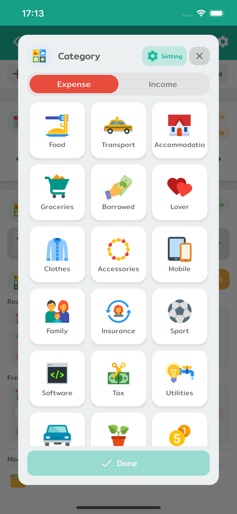


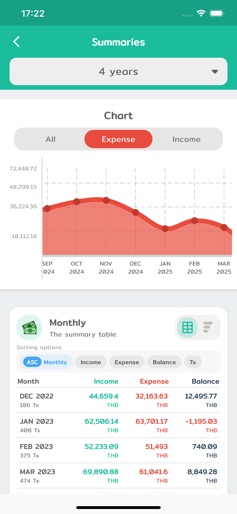
Design Analysis
Visual Design
Style: Custom
Key Features Shown
- •Account Overviews
- •Category Management
- •Pie Chart Summaries
- •Transaction List
- •Monthly Comparison Graphs
App Insights
Target: Tech-savvy individuals and small business owners in Southeast Asia seeking a comprehensive, all-in-one financial dashboard including asset and investment tracking.
- •In-app purchases for premium features
- •Likely one-time or subscription for OCR/receipt scanning
- •Advanced asset and investment tracking tiers
ASO Keywords:
About Wallet Story - Expense Manager
Recording income and expenses is the simplest first step in financial planning. Wallet Story comes equipped with comprehensive features to cover all your financial planning needs. Let's start tracking your income and expenses. Begin your journey to financial freedom with us! Unlimited and Customizable Tracking - Log unlimited income and expense transactions. - Create main categories with subcategories as needed. For example, categorize 'Food' into 'Coffee' or 'Pizza,' making your reports more detailed and comprehensive. - Add tags for specific events, like #ChiangMaiTrip, or instantly attach photos of your slips/receipts. Control Your Accounts and Debts Like a Pro - Read Slips and Receipts: Simply take a photo of a transfer slip or receipt, and the app will automatically read the information and create an income-expense entry for you, significantly reducing manual data entry time. - Simulate Bank Accounts: Easily manage deposits, withdrawals, and transfers. - Manage Debts and Receivables: Accurately track the status of your debts and outstanding income. - Recurring and Scheduled Transactions: Set up recurring income and expenses, such as salaries or mortgage payments, and the app will automatically create the entries each month. - Transaction Templates: Create templates for frequently used transactions to make logging faster without repetitive data entry. - Simulate Credit Cards: Systematically record and track your credit card spending with notifications for upcoming statement dates. Make Your Financial Future a Reality - Savings Goals: Set goals and track your savings progress in percentages. - Budgeting System: Define daily, monthly, or yearly budgets, both overall and for specific categories, to keep your spending in check. - Asset Tracking System: Manage your various assets, whether it's land, a house, or a car, to get a true overview of your net worth. - Investment Tracking System: Record your investments in stocks and various funds, including dividend information received, allowing you to systematically and easily monitor your investment returns. Easy-to-Understand Summaries and Reports - Various Summary Reports: View income and expense summaries daily, weekly, monthly, or yearly. - Charts and Graphs: Reports are presented with beautiful charts and graphs to give you a clear financial overview. - Calendar Summary: See your finances displayed in a calendar format, making it easier to understand and track your daily financial activities. Secure and Convenient - Data Backup: Easily export your data to back up as an Excel or Google Sheets file. - Customizable Icons: Choose from a wide variety of icons to personalize your entries and make them unique. - Customizable Themes: Change the app's color and style to your liking. Whether you prefer a light or dark theme, you can adjust it to fit your user style. -------------------------- Terms and conditions https://walletstory.app/terms Privacy policy https://walletstory.app/privacy # Credit Icons by icons8.com
Create screenshots like Wallet Story - Expense Manager
Use FlyerBanana's free editor to create professional App Store screenshots inspired by Wallet Story - Expense Manager's design. 100+ templates, device frames, and one-click export.
More Finance Apps
View all

Zillow Real Estate & Rentals
Finance


Bank of America Mobile Banking
Finance


Robinhood: Trading & Investing
Finance


GEICO Mobile - Car Insurance
Finance


Branch: Instant Loan & Banking
Finance


FanDuel Sportsbook & Casino
Finance