

App Store Screenshots (5)
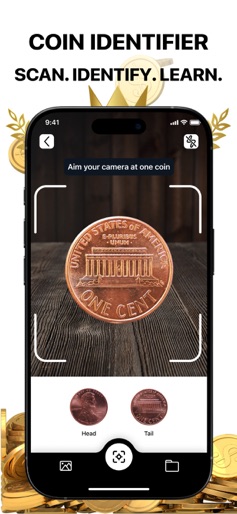
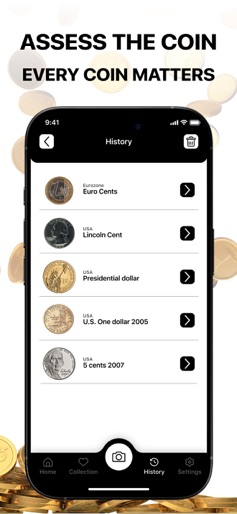



Design Analysis
Visual Design
Style: Custom
Key Features Shown
- •Real-time Camera Scanning
- •Identification History
- •Search by Name
- •Detailed Coin Specifications (Composition, History, Mintage)
- •Collection Folders
App Insights
Target: Numismatists, casual coin collectors, and individuals who find old or foreign currency and want to determine its market value.
- •In-app subscriptions
- •Free trial (3-day)
ASO Keywords:
About ValueCoin: Coin Identifier App
Discover the World of Coins with CoinValue—Your Ultimate Numismatic Companion Unleash the power of precision, accuracy, and simplicity with CoinValue—the premier app for coin identification, valuation, and collection management. Perfect for beginners and experts alike, our cutting-edge scanning technology and vast database make it easier than ever to explore, track, and organize your coins. Key Features: Instant Coin Identification Scan any coin in seconds to uncover its history, value, and key details with unmatched accuracy. Massive Database of 100,000+ Coins Get comprehensive, reliable information on coins from every era and region, including: Rare & collectible coins Commemorative & bullion coins Error coins & special editions Historical & modern world currencies Effortless Collection Management Organize, track, and value your coins with an intuitive, user-friendly interface—all in one place! Why Choose CoinValue? Most advanced scanning tech Largest & most accurate coin database Simple, powerful tools for collectors of all levels Turn every coin into a discovery—Download CoinValue today! Would you like any refinements or a different tone (e.g., more professional, casual, or persuasive)? Enjoy premium access: Unlock limitless AI recognition Identify any coin instantly Get tailored recommendations Full Access Plan: Week Access Pass Month Access Pass Annual Access Pass Every subscription includes a 3-day free trial. Charges to your iTunes account will apply after purchase confirmation. Subscriptions renew automatically unless canceled 24 hours prior to the end of the current period. Manage your subscriptions and auto-renewal in Account Settings. Support and Data Privacy Learn about our privacy policy:https://paronlamout.info/PrivacyPolicy.html Read our Terms of Use to see how we protect your data:https://paronlamout.info/TermsOfUse.html Contact our support staff:boldyinweeks9@gmail.com Download and Enjoy
Create screenshots like ValueCoin: Coin Identifier App
Use FlyerBanana's free editor to create professional App Store screenshots inspired by ValueCoin: Coin Identifier App's design. 100+ templates, device frames, and one-click export.
More Finance Apps
View all

Zillow Real Estate & Rentals
Finance


Bank of America Mobile Banking
Finance


Robinhood: Trading & Investing
Finance


GEICO Mobile - Car Insurance
Finance


Branch: Instant Loan & Banking
Finance


FanDuel Sportsbook & Casino
Finance