

App Store Screenshots (5)

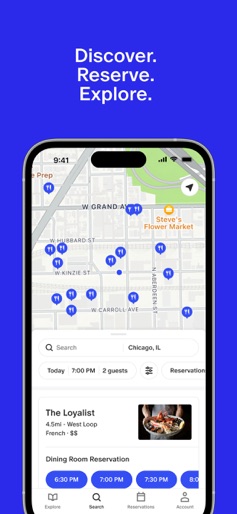

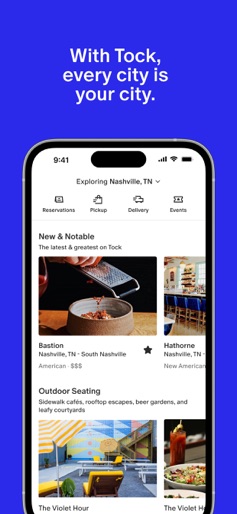

Design Analysis
Visual Design
Style: iOS Native
Colors:
accent
primary
secondary
Bottom Tab Bar navigationHorizontal scrolling cardsMap with custom pinsSegmented control for reservation status
Key Features Shown
- •Map-based discovery
- •Restaurant detail pages
- •Categorized feeds (New & Notable, Outdoor Seating)
- •Reservation management (Upcoming/Past)
- •Time-slot selection
App Insights
Target: High-end diners, culinary enthusiasts, and users seeking exclusive or Michelin-rated dining experiences.
Monetization:
- •B2B SaaS fees for restaurants
- •Transaction fees on prepaid reservations
- •Commission on gift card sales
ASO Keywords:
Tock
About Tock
Discover extraordinary experiences with Tock’s new and improved app. From neighborhood restaurants to Michelin-rated destinations, Tock has something for everyone. Delicious starts here—reserve your experience today.
Create screenshots like Tock
Use FlyerBanana's free editor to create professional App Store screenshots inspired by Tock's design. 100+ templates, device frames, and one-click export.
More Food & Drink Apps
View all
6 shots

DoorDash: Food, Grocery, More
Food & Drink
4.8(21.5M)

6 shots

Uber Eats: Food and Grocery
Food & Drink
4.8(10.1M)

6 shots
Domino's Pizza USA
Food & Drink
4.8(5.0M)

7 shots

Grubhub: Food Delivery
Food & Drink
4.8(4.5M)
9 shots
Instacart: Groceries & Food
Food & Drink
4.8(4.4M)

6 shots

Postmates - Food Delivery
Food & Drink
4.8(2.0M)
Frequently Asked Questions
How can I create screenshots like Tock?
You can create App Store screenshots inspired by Tock using FlyerBanana's free screenshot editor. Choose from 100+ templates, customize colors, text, and device frames, then export in all required sizes.
What screenshot sizes does Tock use?
Tock uses standard App Store screenshot sizes including 6.7" (1290×2796px), 6.5" (1284×2778px), and 5.5" (1242×2208px) for iPhones. FlyerBanana supports all required sizes with one-click export.
Can I use Tock's screenshot style for my app?
Yes! While you shouldn't copy screenshots directly, you can use Tock's design patterns as inspiration. FlyerBanana's templates let you create professional screenshots with similar layouts, color schemes, and visual styles.
What makes good Food & Drink app screenshots?
The best Food & Drink app screenshots clearly showcase key features, use consistent branding, include compelling copy, and follow App Store guidelines. Browse our Food & Drink inspiration gallery to see what top apps do well.