

App Store Screenshots (7)



Design Analysis
Visual Design
App Insights
About Smoothspeak: AI Rizz Keyboard
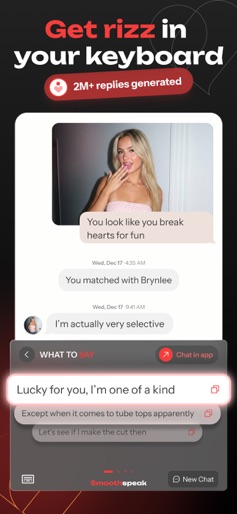
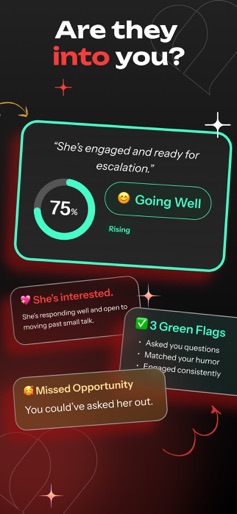
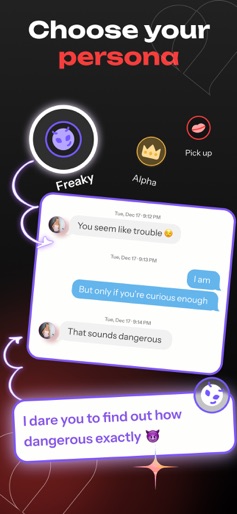
Don’t get left on read and join 100k+ users already loving Smoothspeak. Let our AI craft the perfect messages for you directly in your keyboard. Get rizz right in your keyboard, anywhere you type. Tailored to your style. Smoothspeak is your AI dating assistant, trained with insights from top dating coaches and built by AI experts from Stanford and Google. Whether you’re breaking the ice, keeping the banter flowing, or planning the date, Smoothspeak helps you write messages that feel natural, confident, and you. How it works: 1) Take a screenshot Drop in dating profiles, texts, or social DMs. Smoothspeak understands the context, even mixed sets like a profile + a chat. 2) Get tailored suggestions Receive personalized lines that match the vibe of the convo. Want to tweak the tone? Just chat with Smoothspeak like a friend or your wingman. 3) Type with the Smoothspeak Keyboard Bring text suggestions into any app with our built-in keyboard. Reply smoothly in Tinder, Bumble, Hinge, iMessage, Instagram DMs, WhatsApp, Snap, and more. 4) Personas: change the vibe on demand Switch styles with one tap to fit the moment: Friendly, Freaky, Alpha, Romantic and more. Every persona tailors word choice, pacing, and flirt energy, so you can be versatile without sounding generic. Why Smoothspeak? – The most human-sounding and clever suggestions, compared to other apps like Rizz or Plug AI. -- Remembers your past conversations with the people you are talking with so it feels like a real wingman -- Keyboard integration so you can compose and paste right where you chat – Coach-informed AI trained with techniques from top dating coaches -- Trusted by 100,000+ users leveling up their messages every day What you can generate -- Standout openers that get replies -- Playful teases and flirty riffs that keep momentum -- Smooth escalations that lead to plans without being pushy -- Tone shifts such as more alpha, warmer, or funnier -- Rewrites your texts to have more rizz using our Rizzify mode Join the Smoothspeak community! Support: support@smoothspeak.ai Terms of Use: https://www.apple.com/legal/internet-services/itunes/dev/stdeula/
Create screenshots like Smoothspeak: AI Rizz Keyboard
Use FlyerBanana's free editor to create professional App Store screenshots inspired by Smoothspeak: AI Rizz Keyboard's design. 100+ templates, device frames, and one-click export.
More Entertainment Apps
View all

YouTube
Entertainment


Spotify: Music and Podcasts
Entertainment


TikTok - Videos, Shop & LIVE
Entertainment


Pandora: Music & Podcasts
Entertainment


Shazam: Find Music & Concerts
Entertainment


Photo Lab Picture Editor & Art
Entertainment