
App Store Screenshots (3)

Design Analysis
Visual Design
Style: iOS Native
Key Features Shown
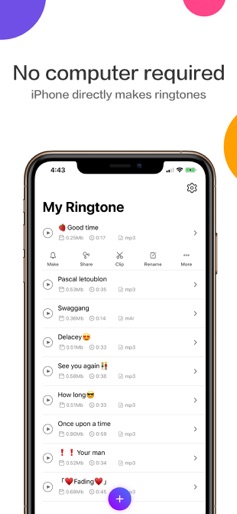
- •Ringtone List Management
- •Ringtone Sharing/Social Library
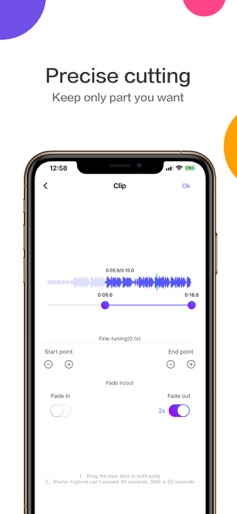
- •Precise Audio Clipping Editor
App Insights
Target: iPhone users looking to customize their device audio without using a computer, specifically those wanting to convert social media videos (TikTok/Reels) into ringtones.
- •Ad-supported (Banner, Interstitial, Video)
- •In-app purchases (Ad-free version)
- •Subscriptions (Hidden/forced trial based on reviews)
ASO Keywords:
About Ringtones Maker - the ring app
Compatible with iOS 26, supports setting as ringtone with one click in just one second. Fixed other known issues. A completely free ringtone production software. Without connection to the computer, the ringtone can be produced via iPhone. Set the song collected by you as ringtone. The APP size is only about 20Mb after optimization (slight difference between different models). Your iPhone ringtone can be produced quickly after quick downloading. Based on the latest production method, the ringtone production can be completed within several seconds. [Service concept] Each iPhone user can successfully produce the ringtone. In case of any problem arising in the process of producing the ringtone, directly contact us as per the contact way in the app to get one-to-one help free of charge. [Advantage] -Many ringtones: The real-time update of popular ringtone, funny ringtone, the latest ringtone and SMS ringtone is realized. -Supports iOS26 one-click setting as ringtone, only takes 1 second. -Many tutorials: Two methods for producing the ringtone (including GarageBand and iTunes) are provided. -Super detailed iPhone ringtone production image-text and video tutorial are detailed into each click with 100% successful setting. -Cover all iPhone models from iPhone4s to the latest iPhone17/Pro/Max. [Feature] -Choose the video from the album and automatically extract the audio from the video. -Import the audio via UTI(Uniform Type Identifier): Import the audio directly from other APPs (such as WeChat and QQ). -Upload the audios (such as mp3 and m4a) to iPhone from the computer via http service. -Accurate to 0.1s ringtone clipping. -Support the fade-in fade-out setting within 1-5s. -Support the video and audio converted to mp3 and m4r formats. -Support the splicing of many ringtone audio files. -Set the audio as charging tone. -Share the ringtone to your friends. [Contact us] Gmail: chentom417@gmail.com Your suggestions are very important for me. You can contact me via "Feedback" in the app.
Create screenshots like Ringtones Maker - the ring app
Use FlyerBanana's free editor to create professional App Store screenshots inspired by Ringtones Maker - the ring app's design. 100+ templates, device frames, and one-click export.
More Entertainment Apps
View all

YouTube
Entertainment


Spotify: Music and Podcasts
Entertainment


TikTok - Videos, Shop & LIVE
Entertainment


Pandora: Music & Podcasts
Entertainment


Shazam: Find Music & Concerts
Entertainment


Photo Lab Picture Editor & Art
Entertainment