
PodsLink - AirPods Battery icon

PodsLink - AirPods Battery

PodsLink

Music & Audio
4.4(15.8K ratings)
Free
Create Screenshots Like PodsLink - AirPods Battery

App Store Screenshots (24)

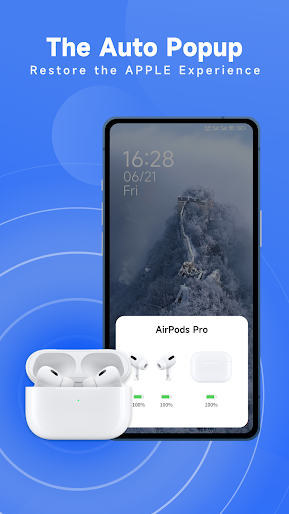
PodsLink - AirPods Battery screenshot 1
PodsLink - AirPods Battery screenshot 2
PodsLink - AirPods Battery screenshot 3
PodsLink - AirPods Battery screenshot 4
PodsLink - AirPods Battery screenshot 5
PodsLink - AirPods Battery screenshot 6
PodsLink - AirPods Battery screenshot 7
PodsLink - AirPods Battery screenshot 8
PodsLink - AirPods Battery screenshot 9
PodsLink - AirPods Battery screenshot 10
PodsLink - AirPods Battery screenshot 11
PodsLink - AirPods Battery screenshot 12
PodsLink - AirPods Battery screenshot 13
PodsLink - AirPods Battery screenshot 14
PodsLink - AirPods Battery screenshot 15
PodsLink - AirPods Battery screenshot 16
PodsLink - AirPods Battery screenshot 17
PodsLink - AirPods Battery screenshot 18
PodsLink - AirPods Battery screenshot 19
PodsLink - AirPods Battery screenshot 20
PodsLink - AirPods Battery screenshot 21
PodsLink - AirPods Battery screenshot 22
PodsLink - AirPods Battery screenshot 23
PodsLink - AirPods Battery screenshot 24

Design Analysis

Visual Design

App Insights

About PodsLink - AirPods Battery

We are committed to providing the best wireless earbuds(AirPods/Beats) experience for Android users. List of supported AirPods: - AirPods 1 - AirPods 2 - AirPods 3 - AirPods 4 - AirPods Pro - AirPods Pro 2 - AirPods Pro 2 (USB-C) - AirPods Pro 3 - AirPods Max - AirPods Max (USB-C) List of supported Beats - Beats Solo³ - Beats Solo⁴ - Beats Solo Pro - Beats Solo Buds - Beats X - Beats Fit Pro - Beats Flex - Beats Studio³ - Beats Studio Buds - Beats Studio Pro - Powerbeats³ - Powerbeats⁴ - Powerbeats Pro With this app, you can: > Enjoy smarter airpods connect for a seamless connection process. > Easily check battery levels for AirPods, Beats, Replica series, and other generic models. > View dynamic animations when your earbuds connect. > Receive real-time status updates with automatic pop-up windows each time you open the charging case. > Customize pop-up wallpapers and animations to personalize your experience. > Explore additional features like gesture settings, voice broadcast, track airpods(offline), and more If you encounter any issues that our FAQ doesn't address, please feel free to email us at xiaolongonly@gmail.com. We will respond as soon as possible after receiving your message. Thank you for your support! We will continue to enhance the app and bring you more convenient features. No matter what, we wish you a wonderful day.

Create screenshots like PodsLink - AirPods Battery

Use FlyerBanana's free editor to create professional App Store screenshots inspired by PodsLink - AirPods Battery's design. 100+ templates, device frames, and one-click export.

More Music & Audio Apps

View all

Frequently Asked Questions

How can I create screenshots like PodsLink - AirPods Battery?
You can create App Store screenshots inspired by PodsLink - AirPods Battery using FlyerBanana's free screenshot editor. Choose from 100+ templates, customize colors, text, and device frames, then export in all required sizes.
What screenshot sizes does PodsLink - AirPods Battery use?
PodsLink - AirPods Battery uses standard App Store screenshot sizes including 6.7" (1290×2796px), 6.5" (1284×2778px), and 5.5" (1242×2208px) for iPhones. FlyerBanana supports all required sizes with one-click export.
Can I use PodsLink - AirPods Battery's screenshot style for my app?
Yes! While you shouldn't copy screenshots directly, you can use PodsLink - AirPods Battery's design patterns as inspiration. FlyerBanana's templates let you create professional screenshots with similar layouts, color schemes, and visual styles.
What makes good Music & Audio app screenshots?
The best Music & Audio app screenshots clearly showcase key features, use consistent branding, include compelling copy, and follow App Store guidelines. Browse our Music & Audio inspiration gallery to see what top apps do well.