

App Store Screenshots (7)




Design Analysis
Visual Design
App Insights
About PlugShare: Charging Stations
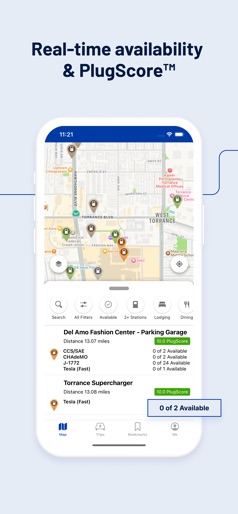
Download the most accurate EV and Tesla charging station map. PlugShare is the world’s largest EV driver community. Drivers contribute station reviews and photos to help the EV community make the most informed charging decisions possible. Drivers can filter the PlugShare map by plug type, including CHAdeMO and SAE/CCS, as well as charging speed, including Level 1, Level 2, and DC Fast Chargers such as Tesla Superchargers. You can also filter by charging provider – the PlugShare map includes detailed station information for every major EV charging network in North America, Europe, and much of the rest of the world, including: - ChargePoint - Tesla Destination - Electrify America - Supercharger - EVgo - FLO - SemaConnect - Shell Recharge - Renovatio Asset Management - Chargefox - Blink - SemaCharge - Volta - bp pulse - BC Hydro EV - GRIDSERVE Electric Highway - ChargeNet - Sun Country - NRMA - Petro-Canada - Circuit Electrique - Pod Point - Evie Networks - GeniePoint - Vector - Lidl eCharge - Ivy - Osprey Charging Network Ltd With PlugShare, you can: - Find public charging stations compatible with your EV (or EVs if you have multiple electric vehicles) - See each station’s PlugScore™ rating to quickly gauge charger reliability based on real driver reviews - Filter for connector type, charging speed, and amenities like food or bathrooms - Check for station functionality and current availability - Link to your favorite navigation app for directions to your selected charger - Pay for charging with Pay with PlugShare (at participating locations) and monitor your session - Add new charging stations to the map as you discover them - Receive notifications when a new charger is installed nearby - Find all the charging stations along a road trip route with a built-in EV trip planner - Use PlugShare with Apple CarPlay to browse nearby charging locations, bookmarked locations, and trips you've planned from the built-in display of CarPlay compatible vehicles - And more! PlugShare helps drivers find chargers compatible with any EV, including Tesla Model X, Tesla Model Y, and Tesla Model 3; the Ford Mustang Mach-E, Chevrolet Bolt, VW ID.4, Nissan LEAF, BMW i3, Audi e-tron, Hyundai Kona, Hyundai Ioniq 5, Porsche Taycan, Kia e-Niro, Volvo XC40, Polestar and all other electric vehicles on the market. Download PlugShare and join the PlugShare community today!
Create screenshots like PlugShare: Charging Stations
Use FlyerBanana's free editor to create professional App Store screenshots inspired by PlugShare: Charging Stations's design. 100+ templates, device frames, and one-click export.
More Maps Apps
View all

The Weather Channel - Radar
Maps


Waze Navigation & Live Traffic
Maps


inDrive. Rides with fair fares
Maps


onX Hunt: GPS Hunting Maps
Maps


MAPS.ME: Offline maps GPS Nav
Maps

GPS Navigation & Map Direction
Maps