

App Store Screenshots (8)





Design Analysis
Visual Design
Style: Custom
Key Features Shown
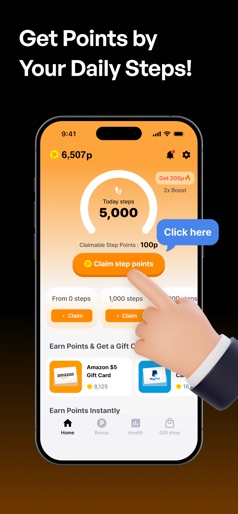
- •Step counting rewards
- •Gift card shop
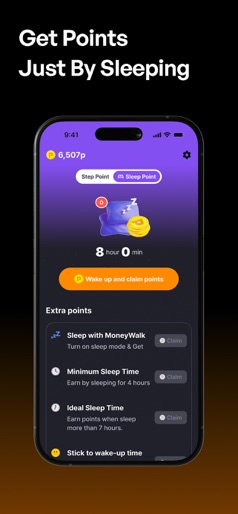
- •Sleep mode points
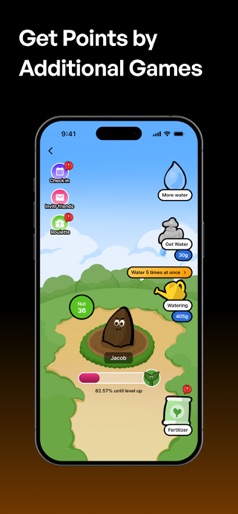
- •Virtual pet/plant mini-game
- •Daily milestone tracking
App Insights
Target: Budget-conscious health enthusiasts, casual gamers looking for rewards, and users interested in passive income through fitness tracking.
- •In-app video advertisements
- •Data monetization (Health/Activity data)
- •Affiliate marketing (Gift card redemptions)
- •Offerwall/Mini-games
ASO Keywords:
About Moneywalk Step Counter&Rewards
[Step Counter, get paid to walk] Walk for your heatlh, recieve points for motivation. Every step you walk makes you money. With the MoneyWalk step counter, you can get 200 points just by walking an effortless 5,000 steps, which only takes 10 minutes. [Advantage of Moneywalk] ※ You can get paid to walk for dollars just by walking You can earn a point by every 100 steps until you walk 5,000 steps. Plus, you can get bonus points for walking up to 10,000 steps for every additional 1,000 steps. Total value of earning points, you can change your favorite gift card. What is surprising is that it is not only a feature to get paid. ※ You can also get a point by playing game There are several games on Moneywalk. You can play rock - paper - scissors, scratch, or feed a plant game. Every time you succeed, you can get points. Earn points and play games for fun ※ Features for health, which is differences between other apps and us Not only to get paid by walking or playing games, you can also take care of your health. Our AI product is so innovative that you can get diagnosed with health just by looking at your camera for 30 seconds. Also, we have a diet log, so if you want to write about your diet, you can write it. It makes you get points also. ※ MoneyWalk, step counter is useful in these situations • If you are looking for free walking app • If you are looking for reward app to get paid to walk or something else • If you want to be healthy and check your status regularly ※ MoneyWalk, step counter is great for these people • Office workers who want to walk regularly • College students who are starting a diet • Those who want to add fun to their walking habits
Create screenshots like Moneywalk Step Counter&Rewards
Use FlyerBanana's free editor to create professional App Store screenshots inspired by Moneywalk Step Counter&Rewards's design. 100+ templates, device frames, and one-click export.
More Entertainment Apps
View all

YouTube
Entertainment


Spotify: Music and Podcasts
Entertainment


TikTok - Videos, Shop & LIVE
Entertainment


Pandora: Music & Podcasts
Entertainment


Shazam: Find Music & Concerts
Entertainment


Photo Lab Picture Editor & Art
Entertainment