

App Store Screenshots (6)


Design Analysis
Visual Design
App Insights
About Mahjong Scapes®
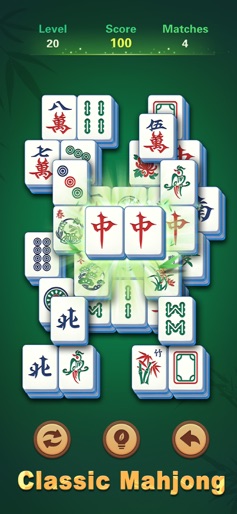
MahjongScapes is a Mahjong Matching Puzzle Game specially designed for seniors. MahjongScapes blends classic mahjong solitaire game with modern game design, catering specifically to the gaming experience of senior players. The game combines entertainment, brain training, and cultural experiences, making it ideal for all players who enjoy mahjong matching games. An immersive courtyard scene that captures the Zen of living in harmony with nature. MahjongScapes offers older adults a comfortable visual experience with large fonts and clear tile design, reducing eye strain. The stress-free game mode eliminates timers and score competition, allowing you to enjoy the game at your own pace. With offline play support, you can enjoy the game anytime, anywhere. Multi-device compatibility ensures optimal gaming experience on phones and pads. Benefits of Playing MahjongScapes Train the brain: By matching mahjong tiles, you can exercise your memory and logical thinking skills. Relaxation: The game's soothing pace and stress-free environment help reduce pressure. Social Interaction: Play with family and friends to enhance social interaction. How to Play MahjongScapes ‒ The gameplay is simple and fun - match identical mahjong tiles to clear the board. ‒ Multiple difficulty levels adapt to different player skill levels, unlocking new levels and challenges as the game progresses. ‒ Game controls are intuitive and straightforward - simply click or swipe to pair tiles effortlessly. ‒ The game features a relaxed pace with no time pressure so that players can enjoy the game at their own rhythm. ‒ Unlock stunning courtyards and switch styles to enjoy a relaxing Zen atmosphere. MahjongScapes Features Classic Meets Innovation: Combining classic mahjong gameplay with innovative elements. Easy-to-Read Large Fonts: Featuring large fonts and clear tile designs to reduce eye strain. Stress-Free Game Mode: No timers or score pressures allow for carefree enjoyment of the game. Useful Hints and Tools: Provides hints and tools to help players solve challenging puzzles. Offline Play: Support for offline mode allows gamers to enjoy anytime, anywhere. Multi-Device Compatibility: Optimized for tablets and smartphones ensuring optimal gameplay. Customizable Backgrounds: Players can choose different backgrounds according to personal preferences for enhanced visual experience. Creative Tile Designs: Offers unique tile designs for a fresh gaming experience. Soothing Relaxing Music: Background music creates a tranquil gaming environment promoting relaxation. Zen Courtyard: Explore various backgrounds for meditation and relaxation, easing stress and anxiety. MahjongScapes creates a peaceful gaming environment that helps relax the mind - an ideal choice for leisurely relaxation among senior players. Download MahjongScapes now to begin your journey of wisdom through personalized gaming fun!
Create screenshots like Mahjong Scapes®
Use FlyerBanana's free editor to create professional App Store screenshots inspired by Mahjong Scapes®'s design. 100+ templates, device frames, and one-click export.






