

App Store Screenshots (8)



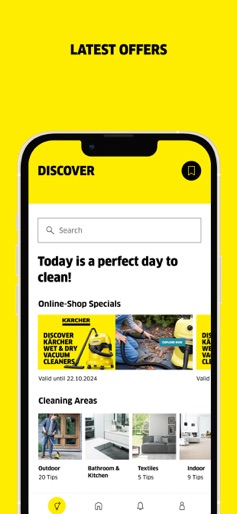
Design Analysis
Visual Design
Style: iOS Native
Key Features Shown
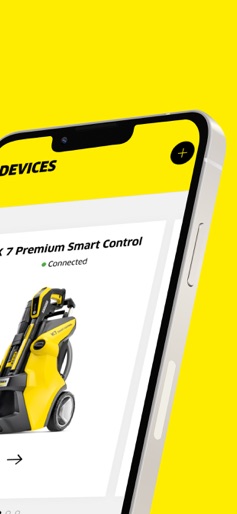
- •Remote Pressure Control
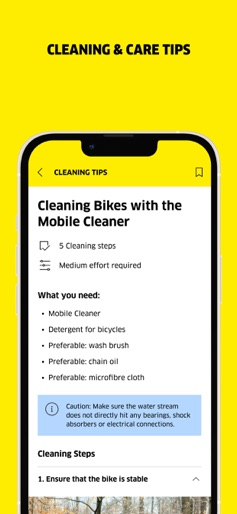
- •Step-by-step Cleaning Guides
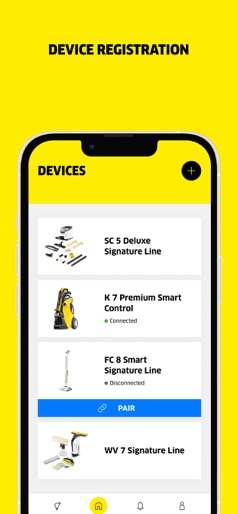
- •Device Inventory Management
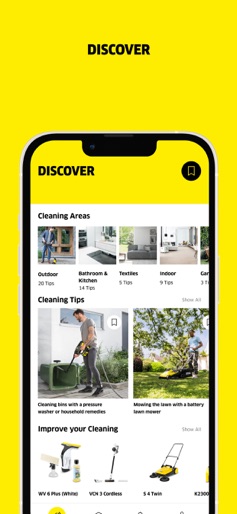
- •Product Discovery
- •Category-based Tips
App Insights
Target: Homeowners, DIY enthusiasts, and vehicle owners who prioritize high-quality maintenance and smart home integration.
- •Hardware Sales (Companion App)
- •Direct-to-Consumer E-commerce (Accessories & Cleaning Products)
- •Service & Warranty Upselling
ASO Keywords:
About Kärcher Home & Garden
The Home & Garden app from Kärcher The cleaning expert for your pocket Whether you need to remove dirt from your bike, clean the patio, tidy the car or clean the bathroom and floors - the Kärcher Home & Garden app makes everything easier. Not only can you use it to control the smart helpers, but the app also provides step-by-step support when setting up new appliances. It also provides access to many other services and our extensive Kärcher cleaning expertise. Here you will find instructions on how to solve any cleaning problems, get the most out of your own products and gently and effectively give your favorite items the WOW back. Discover the Home & Garden app The concentrated cleaning expertise of Kärcher in one place! Device registration Use the app as a central point of contact for device registration. Thanks to a clear list display, you can keep track of your Kärcher products. In addition to the device overview, you have all the information in one place to help you use and deploy the devices correctly. You can see which devices are connected and can pair them directly from the overview. The detailed appliance cards contain installation instructions and appliance overviews for easy commissioning of new appliances and accessories and cleaning products can be ordered directly via the app. Cleaning and care tips for home and garden The highlight of the app is the Discover area, a knowledge pool with comprehensive cleaning instructions for all areas of Home & Garden. Here you will find useful tips and tricks with step-by-step instructions to turn cleaning tasks into a real WOW experience. With additional recommendations on products and cleaning tips, everyone is optimally prepared for their cleaning task. Current offers at a glance Discover attractive offers and online shop specials in the Home & Garden app and save on your next purchase. With our app, you'll always be up to date and won't miss out on any bargains in the future. You can also receive push notifications as soon as there are new offers. Control of smart products The Home & Garden app makes managing and controlling cleaning appliances child's play. It allows you to register smart Kärcher appliances and optionally control them via your smartphone using Bluetooth. With the high-pressure cleaners in the Smart Control Range, you can make the settings manually on the appliance or simply and conveniently transfer the pressure setting recommended in the app for special cleaning tasks from your smartphone to the appliance. With the new FC 8 Smart Signature Line hard floor cleaner, the water volume and roller speed can be set individually via the app and different floor profiles can be created for different areas of the home. This ensures that every room is optimally cleaned, regardless of whether it is tiles, parquet or other hard floors. In addition, statistics are displayed on the cleaning processes, in particular on the time and water savings compared to conventional methods. Digital services The Home & Garden app offers numerous advantages for an optimized user experience. Find quick and uncomplicated help with any questions you may have thanks to our FAQs and direct contact options for Kärcher Service. For example, applying for the additional warranty for our new Signature Line is particularly easy and can be done quickly and conveniently via the app.
Create screenshots like Kärcher Home & Garden
Use FlyerBanana's free editor to create professional App Store screenshots inspired by Kärcher Home & Garden's design. 100+ templates, device frames, and one-click export.
More Home & Garden Apps
View all

Vivint
Home & Garden


Resideo - Smart Home
Home & Garden
AlfredCamera Home Security app
Home & Garden


Planta: Plant & Garden Care
Home & Garden

Plant Parent: Plant Care Guide
Home & Garden

Plant Identifier, Care: Planty
Home & Garden