
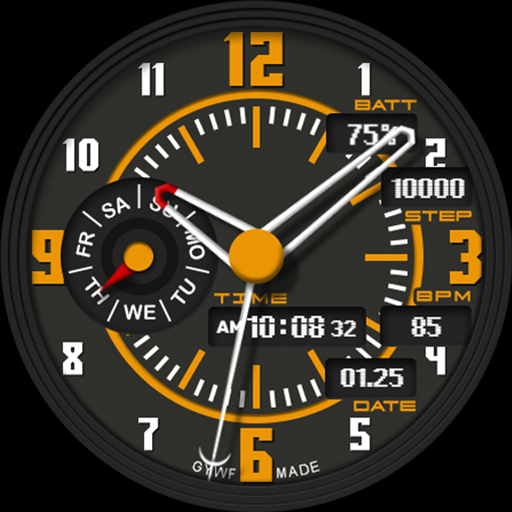
App Store Screenshots (25)


Design Analysis
Visual Design
Style: Hybrid
Key Features Shown
- •Hybrid Analog/Digital view
- •30x Theme Colors
- •Step Counter & Heart Rate
- •Circular Day of Week Gauge
- •Low-power AOD Mode
App Insights
Target: Wear OS smartwatch owners (Samsung Galaxy Watch, Pixel Watch) who prefer a traditional analog aesthetic but require digital fitness metrics.
- •Ad-supported (likely via companion app)
- •Lead generation for developer portfolio
ASO Keywords:
About GYH007: Hybrid watchface
The GYH007 combines the depth of a traditional analog watch with the practicality of a smartwatch. The GYH007 perfectly displays essential fitness data while offering a sophisticated dial design that complements any outfit. 🕒 Sensational Hybrid Design * Sophisticated Analog Hands: The highly legible hand design emphasizes the inherent beauty of a classic watch. * Intuitive Information Placement: The time, date, day of the week, and real-time health indicators are harmoniously placed on the dial. * Dynamic Index: The eye-catching large number indexes combine style and readability. 🎨 Infinite Style Changes * 30 Premium Theme Colors: 30 stylish color palettes are available, instantly customizable to match your strap or fashion. 🛠 Key Information Dashboard * Battery Level: Check your watch's battery status at a glance with the top subdial. * Day of the Week Indicator: The circular gauge at 9 o'clock intuitively indicates the current day. *Real-time fitness data: Monitor your steps and heart rate (BPM) accurately in digital numbers. *Date information: Clearly display the current date on the bottom dashboard. 🌙 Optimized low-power AOD Supports a sophisticated Always On Display mode that minimizes battery consumption while maintaining its unique design identity. ⌚ Supported devices: Supports all devices running Wear OS 3.0 or later (Samsung Galaxy Watch 4, 5, 6, 7, Ultra, Google Pixel Watch, etc.).
Create screenshots like GYH007: Hybrid watchface
Use FlyerBanana's free editor to create professional App Store screenshots inspired by GYH007: Hybrid watchface's design. 100+ templates, device frames, and one-click export.
More Health & Fitness Apps
View all

Flo Cycle & Period Tracker
Health & Fitness


CVS Health
Health & Fitness


Clue Cycle & Period Tracker
Health & Fitness


Headspace: Meditation & Sleep
Health & Fitness


Noom Weight Loss, Food Tracker
Health & Fitness


Impulse - Brain Training
Health & Fitness