Flipster – Digital Magazines icon

Flipster – Digital Magazines

EBSCO Publishing

Books
2.2(205 ratings)
Free
Create Screenshots Like Flipster – Digital Magazines

App Store Screenshots (4)

Flipster – Digital Magazines screenshot 1
Flipster – Digital Magazines screenshot 2
Flipster – Digital Magazines screenshot 3
Flipster – Digital Magazines screenshot 4

Design Analysis

Visual Design

Style: iOS Native

Colors:
accent
primary
secondary
Bottom Tab NavigationSearch BarList ViewFull-screen Reader

Key Features Shown

  • Library Search
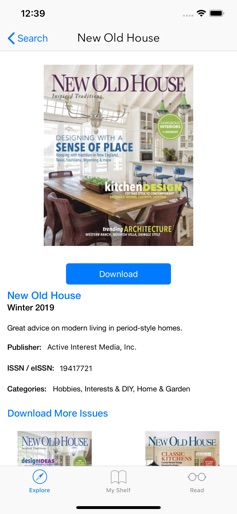
  • Magazine Preview
  • Offline Download
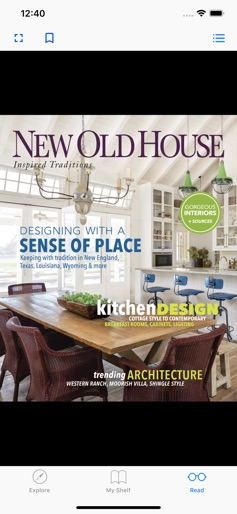
  • Reading Interface

App Insights

Target: Library patrons, students, and researchers who have access to institutional library memberships and prefer reading periodicals on mobile devices.

Monetization:
  • Institutional Licensing
  • B2B SaaS

ASO Keywords:

FlipsterDigitalMagazines

About Flipster – Digital Magazines

Flipster is a free digital magazine service provided courtesy of your library. Find libraries near you that offer Flipster, then explore, download, and read magazines any time on your Apple devices. If you find that your library does not offer Flipster, encourage them to sign up today. Features: - Locate participating libraries - Browse, search, and download popular magazines to read offline - Access digital table of contents for each magazine - Read articles in text view - Tap highlighted areas to jump to articles and related websites - Track percentage of magazine read Now it’s time to relax, put your feet up and read your favorite magazines with Flipster!

Create screenshots like Flipster – Digital Magazines

Use FlyerBanana's free editor to create professional App Store screenshots inspired by Flipster – Digital Magazines's design. 100+ templates, device frames, and one-click export.


More Books Apps

View all

Frequently Asked Questions

How can I create screenshots like Flipster – Digital Magazines?
You can create App Store screenshots inspired by Flipster – Digital Magazines using FlyerBanana's free screenshot editor. Choose from 100+ templates, customize colors, text, and device frames, then export in all required sizes.
What screenshot sizes does Flipster – Digital Magazines use?
Flipster – Digital Magazines uses standard App Store screenshot sizes including 6.7" (1290×2796px), 6.5" (1284×2778px), and 5.5" (1242×2208px) for iPhones. FlyerBanana supports all required sizes with one-click export.
Can I use Flipster – Digital Magazines's screenshot style for my app?
Yes! While you shouldn't copy screenshots directly, you can use Flipster – Digital Magazines's design patterns as inspiration. FlyerBanana's templates let you create professional screenshots with similar layouts, color schemes, and visual styles.
What makes good Books app screenshots?
The best Books app screenshots clearly showcase key features, use consistent branding, include compelling copy, and follow App Store guidelines. Browse our Books inspiration gallery to see what top apps do well.