

App Store Screenshots (5)

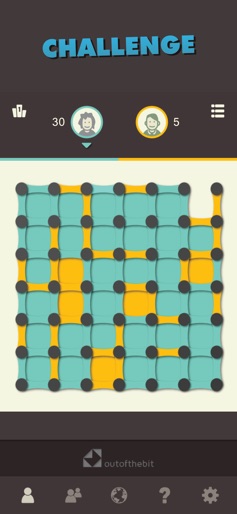


Design Analysis
Visual Design
Style: Custom
Key Features Shown
- •Multiple difficulty modes (Fun, Challenge, Relax)
- •Detailed player statistics
- •Achievement system
- •Game Center integration
- •Clean game board UI
App Insights
Target: Casual gamers, nostalgia seekers, and students looking for quick brain-training sessions. The app targets a broad age range from children to seniors interested in classic board games.
- •Interstitial ads
- •Rewarded video ads
- •In-app purchases (Ad Removal)
ASO Keywords:
About Dots and Boxes - Classic Games
Link the dots, close more squares than your opponent and be first in the Global High-Score, among thousands of players worldwide. From the creators of Four In A Row, another classic! Have your skills changed since you were in school? ^__^ Challenge a friend next to you or find an opponent online. Or try to beat one of our well-trained virtual players ;) DOTS AND BOXES - CLASSIC BOARD GAMES is completely Free. If you love games like Chess, Checkers, Backgammon and other challenging pastimes, you will love Dots and Boxes. Play ‘solo’ or against a real opponent using either our local or online multiplayer mode; play with a friend on the same device or find an opponent from anywhere in the world. DOTS AND BOXES - CLASSIC BOARD GAMES will challenge you according to your abilities, with 3 difficulty levels, and it’s easy to get: tap on the dots to draw lines and close squares. You’re the winner if you got more squares than your opponent when there's no more lines to trace. Can you think of a better brain training? Key features: - Choose between 3 modes of difficulty - Play against real humans online (multiplayer)! - Challenge your friends on the same device (2 players mode) - Climb the high score - Collect Game Center achievements - Enjoy hours of fun with colourful themes - Easy to get, hard to master - Fun for all ages Start closing your boxes now! Free! Thanks for playing! FOLLOW US Facebook/outofthebit @outofthebit
Create screenshots like Dots and Boxes - Classic Games
Use FlyerBanana's free editor to create professional App Store screenshots inspired by Dots and Boxes - Classic Games's design. 100+ templates, device frames, and one-click export.






