

App Store Screenshots (10)


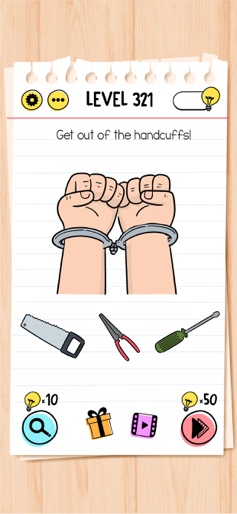


Design Analysis
Visual Design
App Insights
About Brain Test: Tricky Puzzles
Brain Test: Tricky Puzzles is a collection of clever and surprising puzzles built to entertain through misdirection and playful logic. Each level presents an unexpected challenge, rewarding those who enjoy thinking outside the box. The game doesn’t follow typical puzzle formats. Instead, it encourages experimentation and creativity in a casual, accessible way. Whether you're passing time or sharing the fun with others, each puzzle is designed to entertain with humor and originality. Features: • Unconventional puzzle design with surprising twists • Simple mechanics, engaging content • Suitable for solo play or sharing with friends • A relaxed experience, free from pressure or competition • Family friendly mechanics and graphics. Brain Test: Tricky Puzzles is made purely for enjoyment. No timers, no stress—just playful challenges to explore at your own pace. Subscription Terms: VIP PACKAGE: Access offers a weekly subscription, you will have a 3-days FREE trial period, after this period you will be charged. After buying this subscription, you will unlock following features: instant 100 lamps, no ads, double daily gift, 50% cheaper skips and 40% cheaper hints. This is an Auto-renewable subscription. The payment is charged to your account after confirmation. The subscription is renewed unless you turn it off 24 hours before the period ends. Your account will be charged for renewal as well. End of trial and subscription renewal: • The payment is charged to your account after a confirmation of purchase. • The subscription is renewed unless you turn it off 24 hour before the end of the current period. • The account will be charged for renewal within 24 hours before the end of the current period at the cost of the weekly subscription. • The user may manage the subscription and auto-renewal have to be turned off by going to the user’s account settings after purchase in the Store. • No cancellation of the current subscription is allowed during the active subscription period. Canceling a trial or a subscription: • If you want to cancel a subscription during its free trial, you have to cancel it through your account in the Store. This must be done at least 24 hours before the end of the free trial period to avoid being charged. For more information, please visit https://support.apple.com/HT207865 for more information If there is questions contact us unico@unicogames.co Privacy Policy and Terms of Use Privacy Policy: https://unicostudio.co/privacy.html Terms of Use: https://unicostudio.co/terms.html
Create screenshots like Brain Test: Tricky Puzzles
Use FlyerBanana's free editor to create professional App Store screenshots inspired by Brain Test: Tricky Puzzles's design. 100+ templates, device frames, and one-click export.
More Brain Training Apps
View all

Block Blast!
Brain Training


Sudoku.com - Number Games
Brain Training


Vita Mahjong
Brain Training


Match 3D
Brain Training


BlockPuz: Block Puzzle Games
Brain Training

Blockudoku®: Block Puzzle Game
Brain Training