

App Store Screenshots (3)


Design Analysis
Visual Design
Style: iOS Native
Key Features Shown
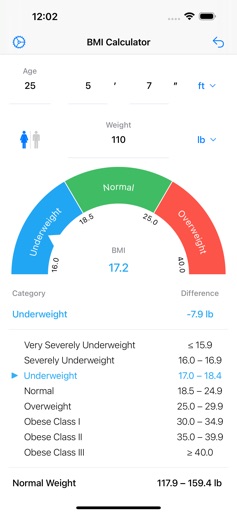
- •Animated visual gauge
- •BMI category breakdown
- •Difference to normal weight calculation
- •Gender and Age selection
App Insights
Target: Health-conscious individuals, dieters, and fitness enthusiasts looking for a quick metric to assess body weight relative to height.
- •Interstitial ads
- •Banner ads
- •In-app purchases for ad removal
ASO Keywords:
About BMI Calculator
Calculate and track your Body Mass Index (BMI) with the most accurate and user-friendly BMI calculator app. KEY FEATURES: • Instant BMI calculation with animated visual gauge • Personalized health insights and ideal weight recommendations • Support for metric kg/cm, imperial lbs/ft, and British stones units • Choice of WHO or DGE German Nutrition Society classification systems • Age-specific calculations for children ages 7 and up, plus adults • Gender-specific BMI evaluation for accurate results • Color-coded BMI categories with real-time visual feedback • Clean, intuitive interface with instant calculations HEALTH BENEFITS: • Monitor your weight loss or weight gain journey • Understand health risks associated with your current BMI • Set realistic goals for achieving your ideal weight • Track progress toward a healthier lifestyle • Early detection of weight-related health concerns CLASSIFICATION SYSTEMS: Choose between two professional BMI classification systems: WHO - World Health Organization: - Underweight: BMI below 18.5 - Normal weight: BMI 18.5-24.9 - Overweight: BMI 25-29.9 - Obese: BMI 30 and above DGE - German Nutrition Society: - Gender-specific BMI ranges - Alternative classification for European standards ADVANCED FEATURES: • Visual BMI gauge with animated indicator • Supports ages 7 and up with child-specific growth charts • Settings persistence - remembers your preferences • Works offline - no internet connection required • Adults-only mode option available IMPORTANT NOTE: BMI is a screening tool that provides a general health indicator. It doesn't account for muscle mass, bone density, or body composition. Always consult healthcare professionals for personalized medical advice. Questions or feedback? Contact us at info@appovo.com
Create screenshots like BMI Calculator
Use FlyerBanana's free editor to create professional App Store screenshots inspired by BMI Calculator's design. 100+ templates, device frames, and one-click export.
More Health & Fitness Apps
View all

Flo Cycle & Period Tracker
Health & Fitness


CVS Health
Health & Fitness


Clue Cycle & Period Tracker
Health & Fitness


Headspace: Meditation & Sleep
Health & Fitness


Noom Weight Loss, Food Tracker
Health & Fitness


Impulse - Brain Training
Health & Fitness