
App Store Screenshots (8)



Design Analysis
Visual Design
App Insights
About Arlo Secure: Home Security
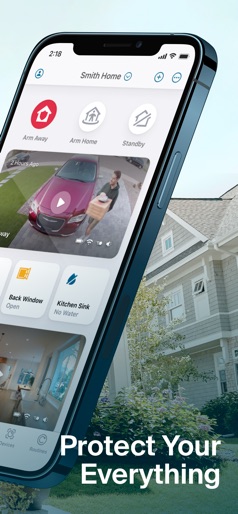
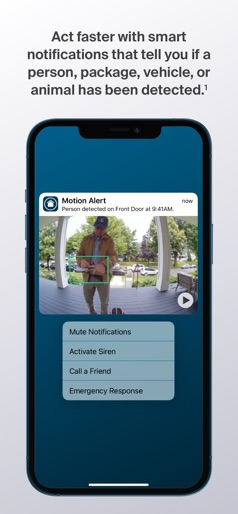
Control your Arlo smart home security system with one, easy-to-use app. Use the Arlo Secure App to protect your home, inside and out, with Arlo’s award-winning home security system, video doorbells, cameras, and floodlight. Protect your everything and personalize your entire home security system. With the Arlo Secure App, you can control multiple locations at once and quickly arm or disarm your system with one tap. Get round-the-clock protection with 24/7 Live Security Experts that will monitor your home, so you don’t have to or use one tap Emergency Response to quickly get police, fire, or medical help to your home.* Easily customize your security by creating smart activity zones to reduce unwanted notifications and set schedules to arm or disarm your system. See important details from your home security camera system with up to 4K resolution, 12X zoom image capabilities, and color night vision. When motion is detected, receive interactive notifications on your phone and watch an animated preview, call a friend, activate a siren, or initiate Emergency Response.* With an Arlo Secure plan and an Arlo camera, video doorbell, or floodlight camera, you can view 30 days of video history, receive notifications that tell you when a person, package, vehicle, or animal has been spotted with advanced AI Object Detection. Disclaimers: *Emergency Response (available in the United States only), Object Detection and Video History require an Arlo Secure paid plan after trial period. **4K resolution, 12X zoom image capabilities, color night vision, and Emergency Response features vary by camera model. Privacy Policy: https://www.arlo.com/en-us/about/privacy-policy/ Terms of Service: https://www.arlo.com/en-us/terms-and-conditions.html
Create screenshots like Arlo Secure: Home Security
Use FlyerBanana's free editor to create professional App Store screenshots inspired by Arlo Secure: Home Security's design. 100+ templates, device frames, and one-click export.











